
How to start an exercise
On the Learn screen, choose a mode and category, then tap Start. First add vocabulary to the category.
- Choose Smart or Manual mode.
- Select a category — tap so a checkmark appears next to the category name.
- Tap Start.
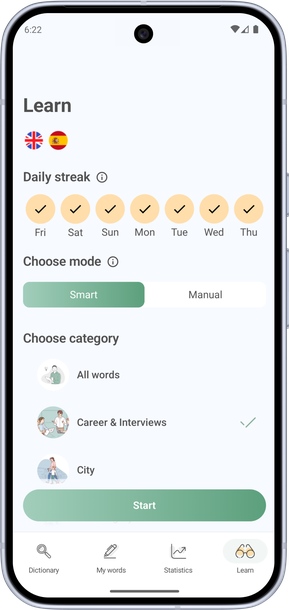
Learning modes
- Smart — the app automatically picks words and exercises for better retention and progress. Spaced repetition helps you absorb material more effectively.
- Manual — learn at your own pace and choose exercises yourself. Words appear in random order. If you tap Continue at the end of a session, you get new words until you have reviewed them all.
Available exercises
In Manual mode, these exercises are available:
- Flashcards — browse words and their translations. Tap a card to flip it, and Info to learn more about the word. Match pairs to reinforce them.
- Test — type or choose the correct translation.
- Dictation — write down the word you hear to improve spelling and listening.
- Speaking — practice pronunciation by saying words, translations, or full phrases. The app plays the correct pronunciation so you can repeat it.
- Phrases — use words in context by filling in gaps in sentences. Pick the right word.
- Reading — read a text based on the selected topic and answer open-ended questions. Practice as you would on an exam.