
Import a CSV file
To load words from Excel or Numbers, export your word table as CSV.
Supported columns:
- word in the source language (required)
- translation in the learning language (required)
- part of speech
- word transcription
- and 6. phrase and translation — these two columns must follow each other.
Sample CSV row with all fields:
"dog";"собака";"noun";"dɒɡ";"This is a dog.";"Это собака."You can also create a file with just three columns. For example:
"dog";"собака";"noun";How to import CSV in the app
- On the Dictionary screen, tap +.
- In the menu, choose Import words.
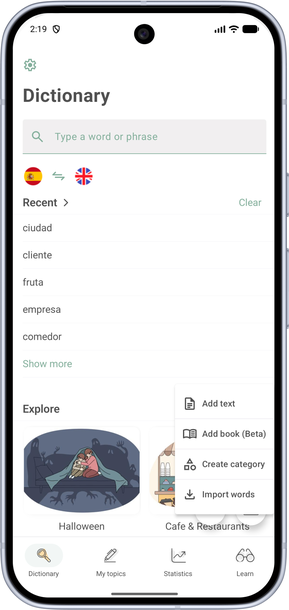
- Add or remove the fields you need: part of speech, transcription, usage example. The word and translation columns are required.
- Arrange the columns in the same order as in your file, then finish the import. To drag a cell, press and hold the arrows on Android or the three lines on iOS.
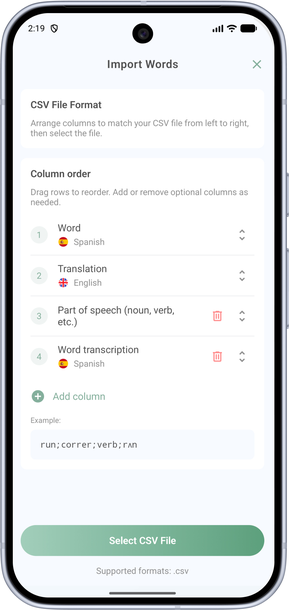
- Once the file structure is set up, tap Select CSV file.
- Review the imported words. To edit a word, press and hold its cell.
- At the bottom of the screen, choose a category and tap + to add the words.